LFS Цветной текст (HTML код)
<main>

  <h1>LFS Text Colour Playground</h1>

  <p>

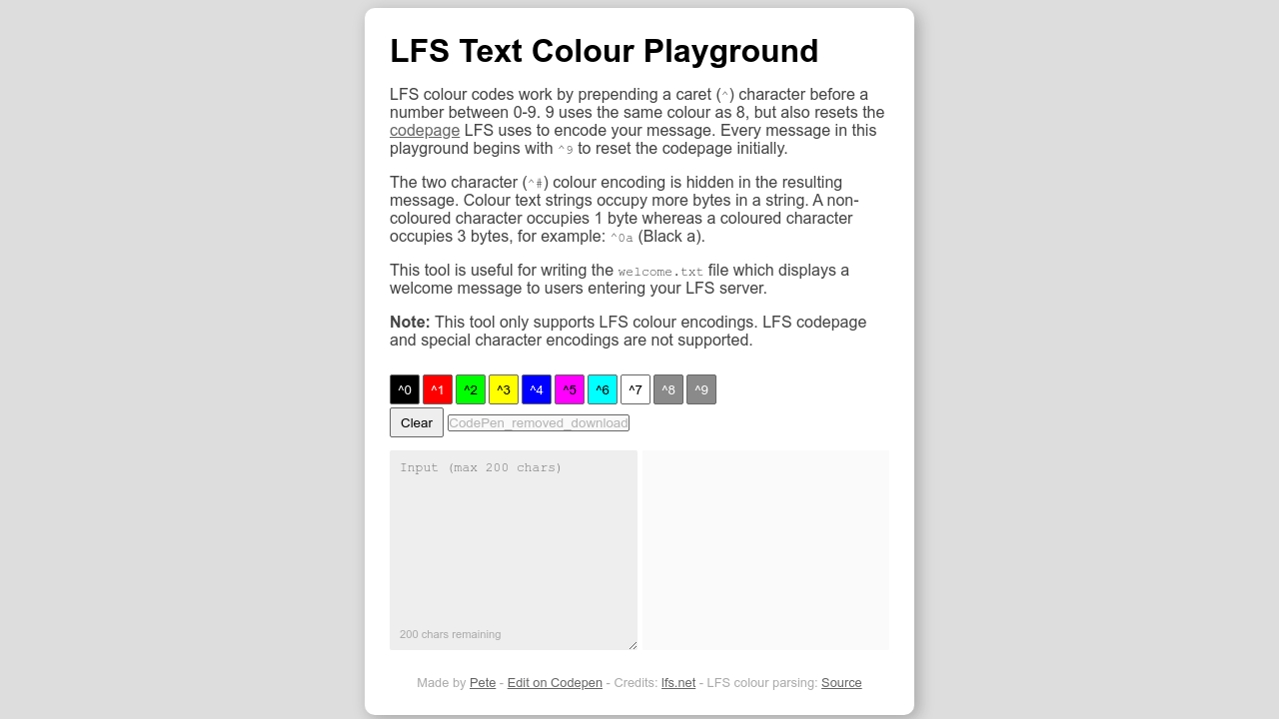
    LFS colour codes work by prepending a caret (<code>^</code>) character before a number between 0-9. 9 uses the same colour as 8, but also resets the <a href="https://en.lfsmanual.net/wiki/LFS_Programming#LFS_Strings_and_Escape_Codes" target="_blank">codepage</a> LFS uses to encode your message. Every message in this playground begins with <code>^9</code> to reset the codepage initially.

  </p>

  <p>

    The two character (<code>^#</code>) colour encoding is hidden in the resulting message. Colour text strings occupy more bytes in a string. A non-coloured character occupies 1 byte whereas a coloured character occupies 3 bytes, for example: <code>^0a</code> (Black a).

  </p>

  <p>

    This tool is useful for writing the <code>welcome.txt</code> file which displays a welcome message to users entering your LFS server.

  </p>

  <p><strong>Note:</strong> This tool only supports LFS colour encodings. LFS codepage and special character encodings are not supported.

  <div class="controls">

    <div id="colour_palette" class="colour_palette"></div>

    <div>

      <button id="clear" class="clear" title="Clear input">Clear</button>

      <button id="download" class="download" title="Download welcome.txt" disabled>Download</button>

    </div>

  </div>

  <div class="in_out">

    <textarea maxlength="200" placeholder="Input (max 200 chars)" id="input" class="input"></textarea>

    <div id="output" class="output"></div>

    <div id="char_count" class="char_count">200 chars remaining</div>

  </div>

  <div class="credits">

    Made by <a href="https://twitter.com/pwsbutcher" target="_blank">Pete</a> - <a href="https://codepen.io/pbutcher/pen/dyRjobx" target="_blank">Edit on Codepen</a> - Credits: <a href="https://lfs.net" target="_blank">lfs.net</a> - LFS colour parsing: <a href="https://apidocs.tc-gaming.co.uk/guides/converting-lfs-colours" target="_blank">Source</a>

  </div>

</main>
LFS Цветной текст (CSS код)
body {

  font-family: sans-serif;

  background-color: #ddd;

}


main {

  background-color: #fff;

  padding: 25px;

  border-radius: 10px;

  box-shadow: 4px 4px 16px rgba(0, 0, 0, 0.25);

  max-width: 550px;

  margin: 0 auto;

  box-sizing: border-box;

  overflow: auto;

}


h1 {

  margin-top: 0px;

  margin-bottom: 0px;

}


p {

  color: #444;

}


a {

  color: #666;

}


.controls {

  display: flex;

  justify-content: space-between;

  flex-wrap: wrap;

  margin-top: 25px;

  margin-bottom: 10px;

}


.controls button {

  border-radius: 2px;

  padding: 0px;

  border: solid 1px #666;

  transition: opacity 0.15s ease-in-out;

  margin-bottom: 3px;

}

.controls button:hover {

  cursor: pointer;

  opacity: 0.5;

  transition: opacity 0.15s ease-in-out;

}


.colour_palette_option {

  width: 30px;

  height: 30px;

  margin-right: 3px;

}


button.clear, button.download {

  height: 30px;

  background-color: #eee;

  padding: 0px 10px;

}


button.download[disabled] {

  cursor: not-allowed;

}


.in_out {

  position: relative;

  display: flex;

}


.input {

  border: none;

  background-color: #eee;

  padding: 10px;

  box-sizing: border-box;

  border-radius: 2px;

  margin-right: 5px;

  width: 50%;

  height: 200px;

}


.output {

  width: 50%;

  font-weight: bold;

  border-radius: 2px;

  background-color: #fafafa;

  padding: 10px;

  box-sizing: border-box;

  text-shadow: 1px 1px rgba(0, 0, 0, 0.3);

  overflow: scroll;

  word-wrap: break-word;

}


.char_count {

  position: absolute;

  bottom: 0;

  margin: 0px 0px 10px 10px;

  font-size: 0.7em;

  color: #aaa;

}


.char_count_critical {

  color: red;

}


.credits {

  padding-top: 25px;

  font-size: 0.8em;

  text-align: center;

  color: #aaa;

}


/* Text */

.lfs_col0 {

  color: #000000;

}


.lfs_col1 {

  color: #ff0000;

}


.lfs_col2 {

  color: #00ff00;

}


.lfs_col3 {

  color: #ffff00;

}


.lfs_col4 {

  color: #0000ff;

}


.lfs_col5 {

  color: #ff00ff;

}


.lfs_col6 {

  color: #00ffff;

}


.lfs_col7 {

  color: #ffffff;

}


.lfs_col8, .lfs_col9 {

  color: #8a8a8a;

}


/* Buttons */

.lfs_b_col0 {

  background-color: #000000;

  color: #ffffff;

}


.lfs_b_col1 {

  background-color: #ff0000;

  color: #ffffff;

}


.lfs_b_col2 {

  background-color: #00ff00;

}


.lfs_b_col3 {

  background-color: #ffff00;

}


.lfs_b_col4 {

  background-color: #0000ff;

  color: #ffffff;

}


.lfs_b_col5 {

  background-color: #ff00ff;

}


.lfs_b_col6 {

  background-color: #00ffff;

}


.lfs_b_col7 {

  background-color: #ffffff;

}


.lfs_b_col8, .lfs_b_col9 {

  background-color: #8a8a8a;

  color: #ffffff;

}


@media (max-width: 570px) {

  html, body {

    margin: 0px;

    height: 100%;

  }


  main {

    max-width: 100%;

    margin: auto;

    height: 100%;

  }

}

@media (max-width: 500px) {

  .in_out {

    flex-wrap: wrap;

  }


  .input {

    width: 100%;

    height: 120px;

    margin-bottom: 10px;

    margin-right: 0px;

  }


  .output {

    width: 100%;

    height: 120px;

  }

}
LFS Цветной текст (JS код)
document.addEventListener('DOMContentLoaded', () => {

  const input = document.querySelector('#input');

  const output = document.querySelector('#output');

  const colourPalette = document.querySelector('#colour_palette');

  const charCount = document.querySelector('#char_count');

  const clear = document.querySelector('#clear');

  const download = document.querySelector('#download');


  generateColourPaletteOptions();


  input.addEventListener('keyup', onInputKeyUp);

  clear.addEventListener('click', clearInput);

  download.addEventListener('click', downloadInput);


  function generateColourPaletteOptions() {

    for (let i = 0; i < 10; i++) {if (window.CP.shouldStopExecution(0)) break;

      let colourPaletteOption = document.createElement('button');

      colourPaletteOption.classList.add('colour_palette_option');

      colourPaletteOption.classList.add(`lfs_b_col${i}`);

      colourPaletteOption.setAttribute('title', `^${i}`);

      colourPaletteOption.innerText = `^${i}`;

      colourPaletteOption.addEventListener('click', e => {

        input.value = `${input.value}^${i}`;

        input.focus();

        updateCharsRemaining();

      });

      colourPalette.appendChild(colourPaletteOption);

    }window.CP.exitedLoop(0);

  }


  function onInputKeyUp(e) {

    output.innerHTML = parseLFSColours(`^9${input.value}`);

    if (input.value.length >= 175) {

      charCount.classList.add('char_count_critical');

    } else {

      charCount.classList.remove('char_count_critical');

    }

    updateCharsRemaining();

  }


  // Adapted from: https://apidocs.tc-gaming.co.uk/guides/converting-lfs-colours

  function parseLFSColours(str) {

    const parts = str.split(/(\^\d)/g).slice(1);

    let res = "";

    parts.forEach(function (el, i, arr) {

      i % 2 === 0 ? arr[i] = el.slice(1) : res += '' + el + '';

    });

    return withLineBreaks(res);

  }


  function updateCharsRemaining() {

    const len = input.value.length;

    charCount.innerText = `${200 - len} chars remaining`;

    if (len === 0) {

      download.setAttribute('disabled', true);

    } else {

      download.removeAttribute('disabled');

    }

  }


  function clearInput() {

    input.value = '';

    input.focus();

    updateCharsRemaining();

    output.innerHTML = '';

  }


  function downloadInput() {

    const el = document.createElement('a');

    el.setAttribute('href', `data:text/plain;charset=utf-8,${encodeURIComponent(input.value)}`);

    el.setAttribute('download', 'welcome.txt');

    el.style.display = 'none';

    document.body.appendChild(el);

    el.click();

    document.body.removeChild(el);

  }


  // Helper to replace `/n` with


  function withLineBreaks(str) {

    return str.replace(/
/g, "
");

  }

});

//# sourceURL=pen.js
LFS Цветной текст (Результат кода)
Comments